The handpan's capo: the same shape in every key
On an electronic handpan in Logic mode, a degree's constellation keeps the same shape whatever the key. Same gestures, different pitch — like a capo on a guitar.
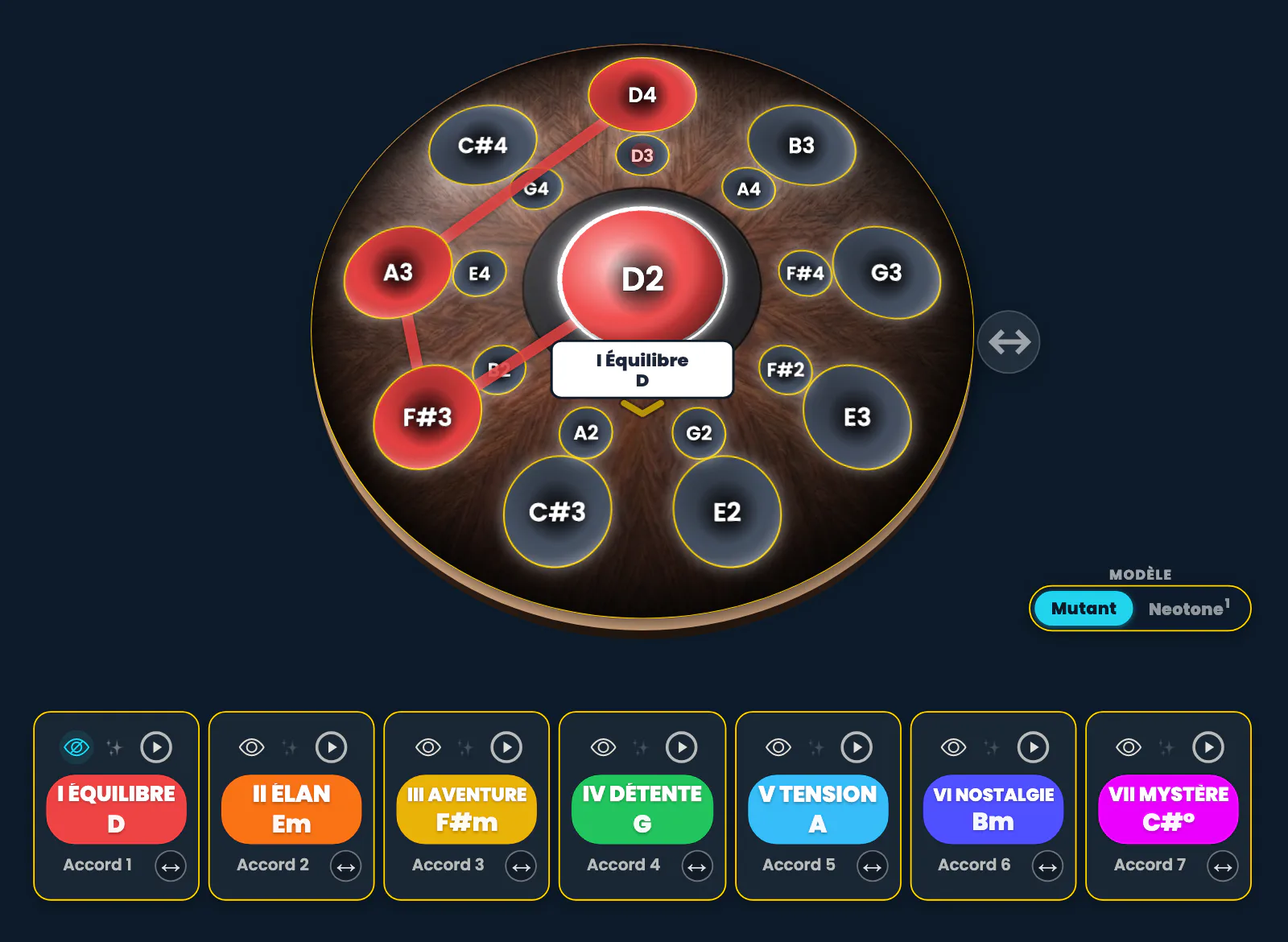
This article is about the electronic handpan — today, a 19-note Neotone Mutant. On an acoustic handpan the notes cannot move: what follows does not exist there in this form.
Click the image to open it, then click again for full size.
What a guitarist does with a capo
A guitarist clamps a bar onto the neck and then plays exactly the same shapes as before. The fingers don’t change; the key does. Nothing has been relearned — only the starting point has moved.
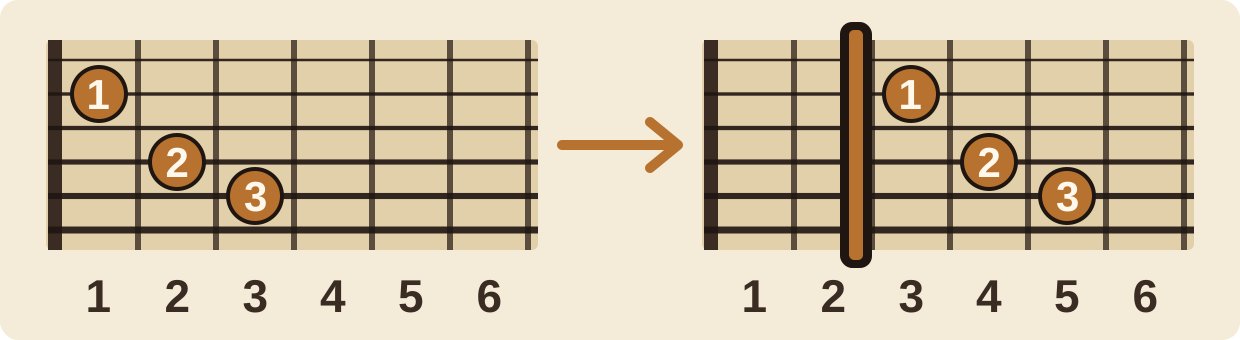
Click the image to open it, then click again for full size.
The electronic handpan, in Logic mode, does the same thing. You change the anchor note, and everything you already knew how to play stays playable, in the same place, with the same gestures — in another key.
The anchor wheel is the handpan’s capo
On the electronic handpan, the bar is called the anchor note. You pick it on a wheel of twelve petals, one per semitone. Touching a petal means clamping the capo somewhere else.
Take the constellation of scale degree I — the one the app calls Balance. Choose the anchor note C, then D, then A, and look at the pan each time.
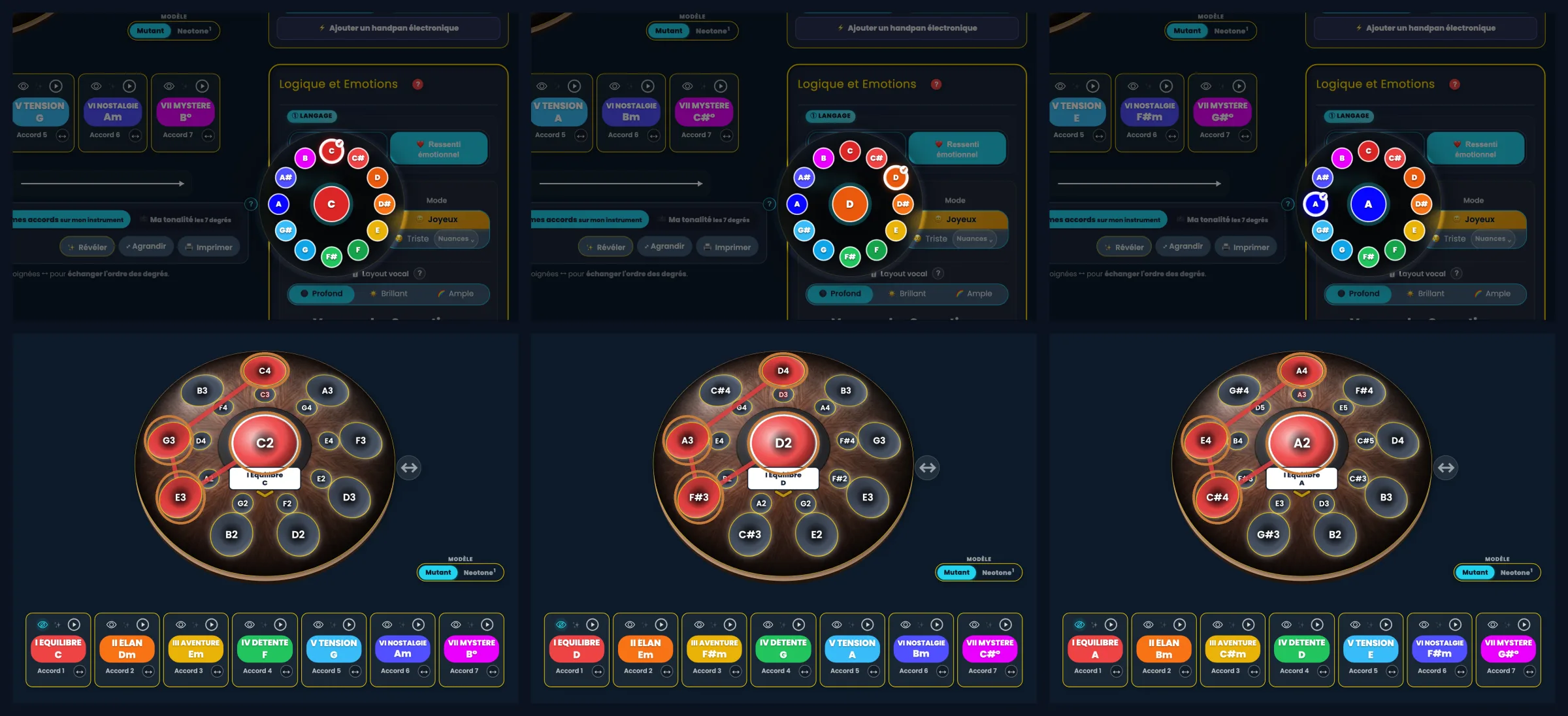
Click the image to open it, then click again for full size.
Look at the copper rings: they are the same positions, joined by the same path, in all three columns. What changes is the name written on them — C, E, G in C; D, F#, A in D; A, C#, E in A. The gestures stay, the key changes: exactly what a capo does.
Why it holds
It is how Logic mode is built.
A degree’s shape is drawn on the pan’s positions — the notes of the pan, identified by where they sit — and not on the note names. Degree I means “those positions, linked in that order”. When you change key, the app recalculates what each position plays, without ever touching the drawing.
Put another way: the geometry is fixed on one side, the sounding content on the other. Transposing only moves the second. That is why the shape never deforms: nothing in the mechanism can make it move.
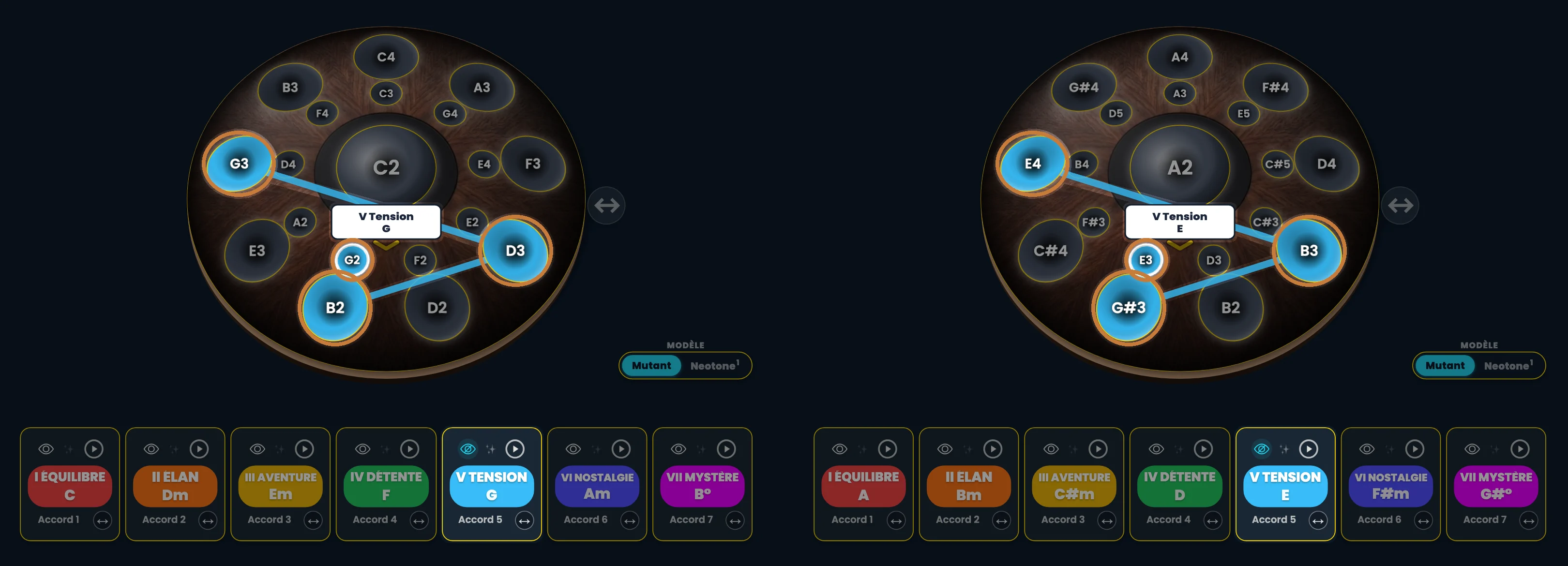
Click the image to open it, then click again for full size.
Learning a chord without the note names
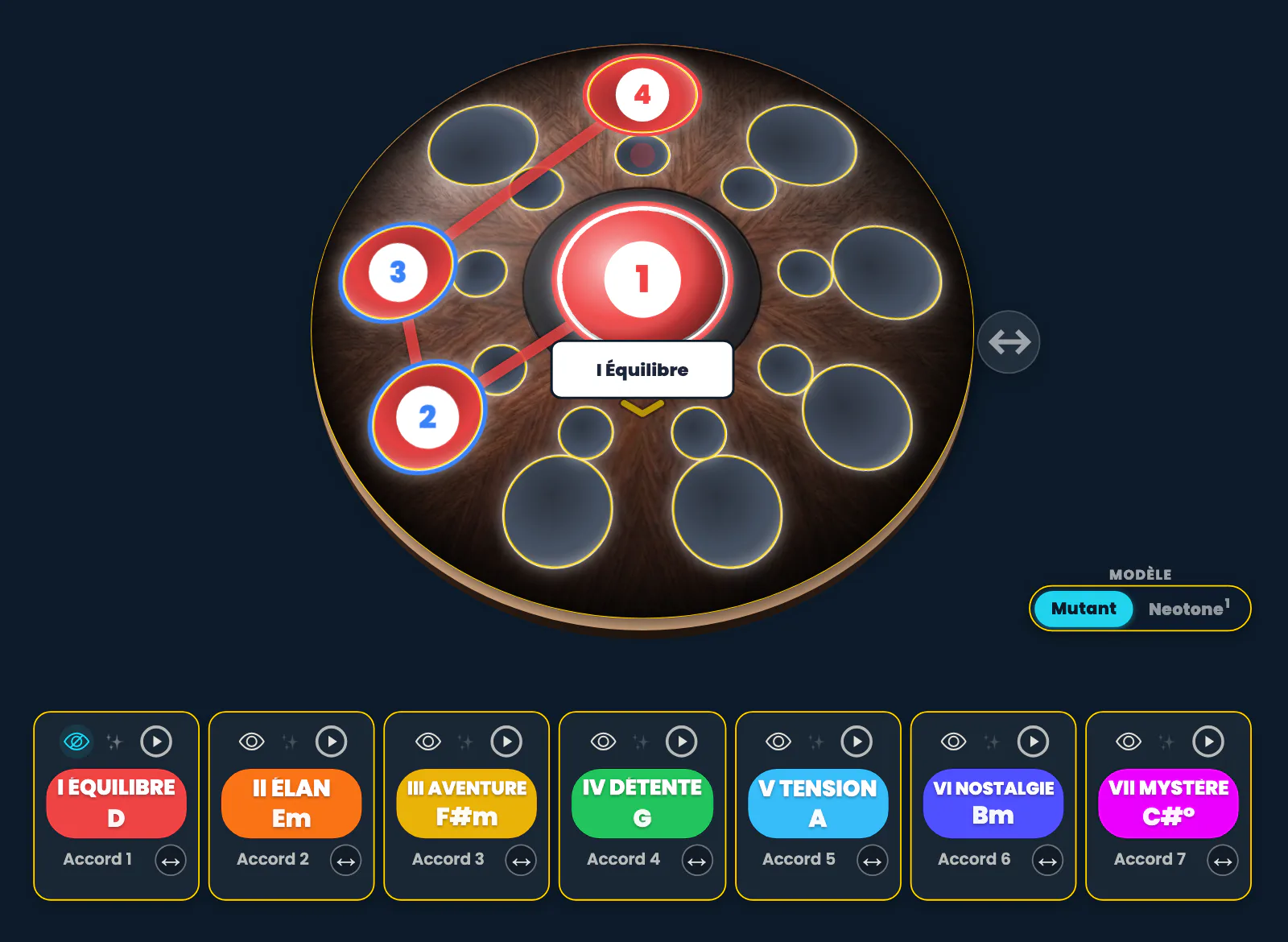
And if note names get in your way, you can do without them. In the tool palette, Notation section, the 🚫 button (“No note names”) clears the names on the pan; the “Playing order number 1·2·3” box shows instead the order in which to strike the notes of the chord. In the Hands & fingering section, the ✋ button (“Hands in colour”) colours each number by the hand that plays it: blue for the left, red for the right.
Click the image to open it, then click again for full size.
So you can learn a chord without even knowing the names of its notes. What you need to know comes down to two things: which key you’re in (the anchor note), and the order of the chords in the song. And that order is remembered through colours, by thinking in scale degrees — or as a journey of emotions: I Balance, II Momentum, III Adventure, IV Relaxation, V Tension, VI Nostalgia, VII Mystery. A song becomes a path of sensations rather than a list of letters. That is what Logic mode is all about.
Two very concrete uses
Accompanying a voice
A singer tells you your scale sits too high for her. On an acoustic instrument, the conversation stops there. On an electronic handpan, you drop the anchor by two tones and play the same piece, with the same gestures, in the vocal range where her voice settles.
You haven’t transposed a piece: you have transposed the instrument. What you rehearsed still holds.
Joining other musicians
A session starts, someone calls the key. You set your anchor there — one petal to touch on the wheel, the one shown in the three-key grid — and play. No “sorry, I’m in D”, no second instrument to unpack: the repertoire you know follows you.
A clear frame, rather than cognitive chaos
This is where it becomes more than a trick. A Neotone can play just about anything; its possibilities are practically infinite. What reads as a beautiful promise on paper becomes, in practice, what David calls cognitive chaos: too many open doors, none of them a place to rest your hand.
Logic mode answers that with a frame. The same placement of notes by degree in every key. You learn once where the I, the IV and the V live — and that map stays true everywhere. What you gain isn’t power, it’s stability: a fixed point inside an instrument that could otherwise be everything at once.
This holds for all major scales and for natural minor: identical shape, different content.
For harmonic minor, the same: in C minor, degree V, moving from natural to harmonic leaves the same four positions lit and the same path. Only one note changes: the 7th rises a semitone, B♭ becomes B. The variant changes what you hear, not what you see.
Mutant or Neotone 1: what differs
The Mutant plays every major and minor scale. It is what makes the reasoning above complete, with its seven degrees available.
On the Neotone 1, the notions of degree and chord apply too — but in a limited way: not all seven degrees are there. The logic is the same, the ground is narrower.
And on the acoustic side
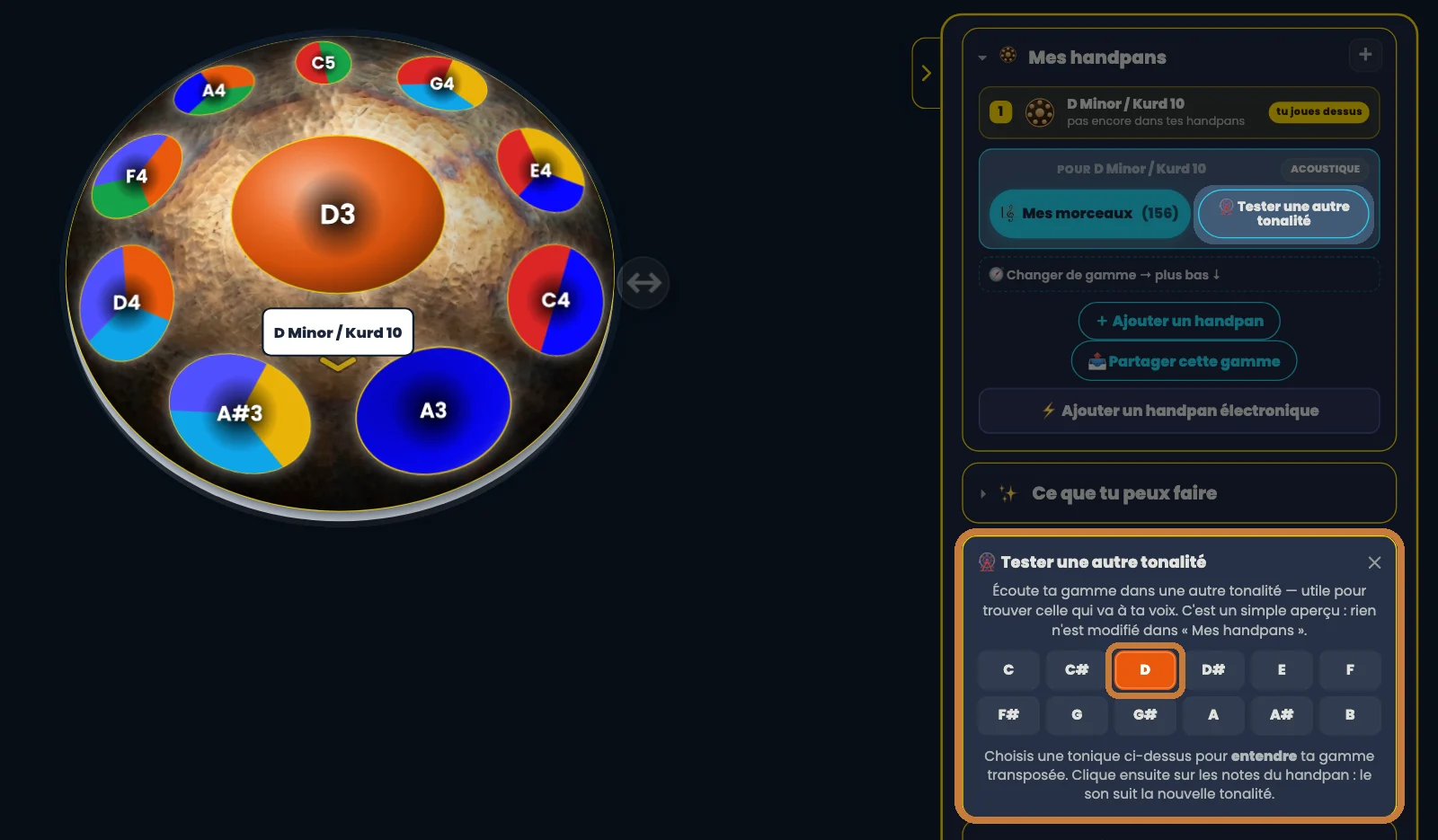
In acoustic mode, there is a “Try a different key” button. It serves something else. It lets you hear your scale in another key — every note shifted by the same distance — so you can tell whether that pitch would suit your voice better. It’s a preview: as soon as you close it, your scale comes back exactly as it was. Its main use is choosing an instrument before buying it.
It is not a capo. Your real acoustic pan hasn’t moved by a semitone — and it cannot. On an acoustic instrument, a chord’s constellation is worked out from the notes actually present: it speaks about your instrument, and it changes from one scale to another. It simply isn’t the same promise.
Click the image to open it, then click again for full size.
Going further
Once the key no longer holds you back, the next question becomes: at which height to place the chords under a voice. That’s the subject of the vocal layouts — Deep, Wide, Bright — which move the octaves without touching the shapes.
And if reading the colours on the pan isn’t clear yet, go back to The two ChromaKeys readings: the colour that tells you the note, and the colour that tells you its place in the scale. Those two readings are what make the constellation legible.
Open Handpan Constellation Studio, switch to Logic mode, and change the anchor while keeping your eye on the shape. It will not move.
Ready to make your colours sing?
Try the app for free, or discover the electronic Neotone handpan.