Reading the colours: the note, its place in the scale, or nothing
Reading the colours means answering three independent questions: what the colour says, whether shared notes split apart, and whether chords are drawn. Three settings, valid on an acoustic handpan and an electronic one alike.
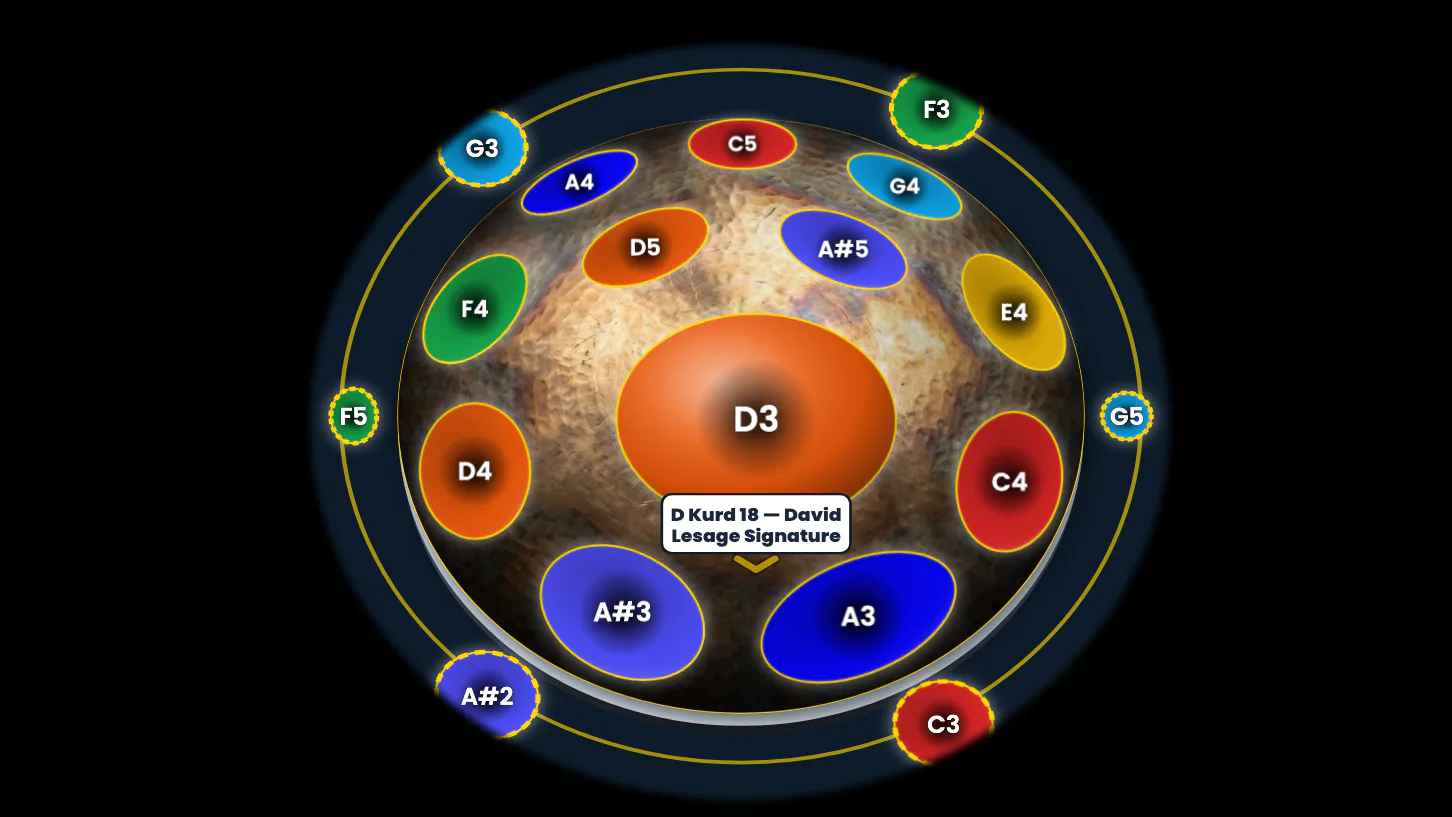
Whether your handpan is acoustic or electronic, a colour can say two things.
It can say which note you have under your fingers. Or it can say which place that note holds in your scale.
These are two different readings of the same instrument, and both are right.
The app doesn’t choose for you: it lets you choose. It’s a setting, it takes one click, and it’s called ChromaKeys.
To see this language in motion, here is the first video of the series about the app.
On a handpan, the note in the centre is domed: that’s the ding. The other notes are hollowed into the metal. Here, they are all simply called notes.
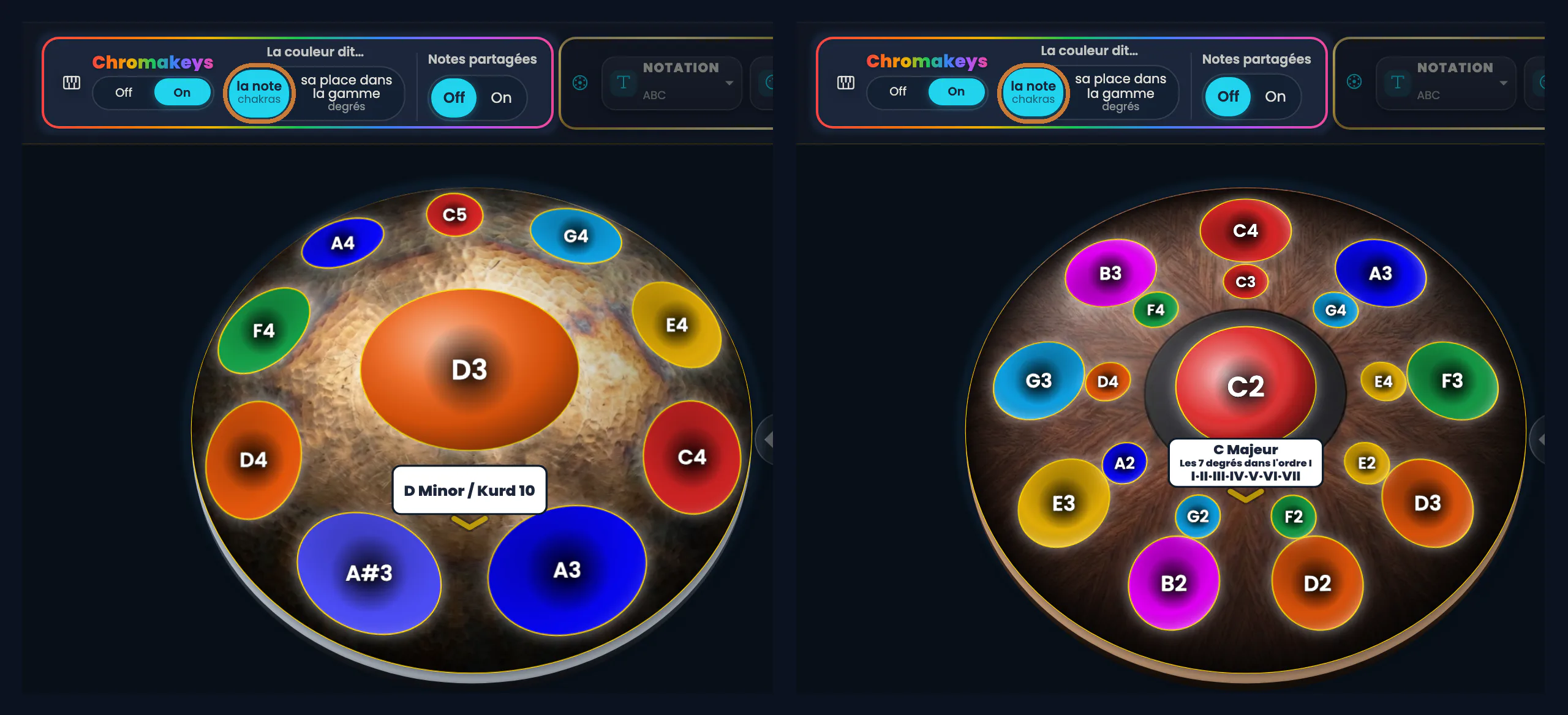
Click the image to open it, then click again for full size.
And what if the colour said nothing? Under the ChromaKeys name there is an Off / On switch. On Off, the colours go out and the pan is bare metal again. On On, they come back.
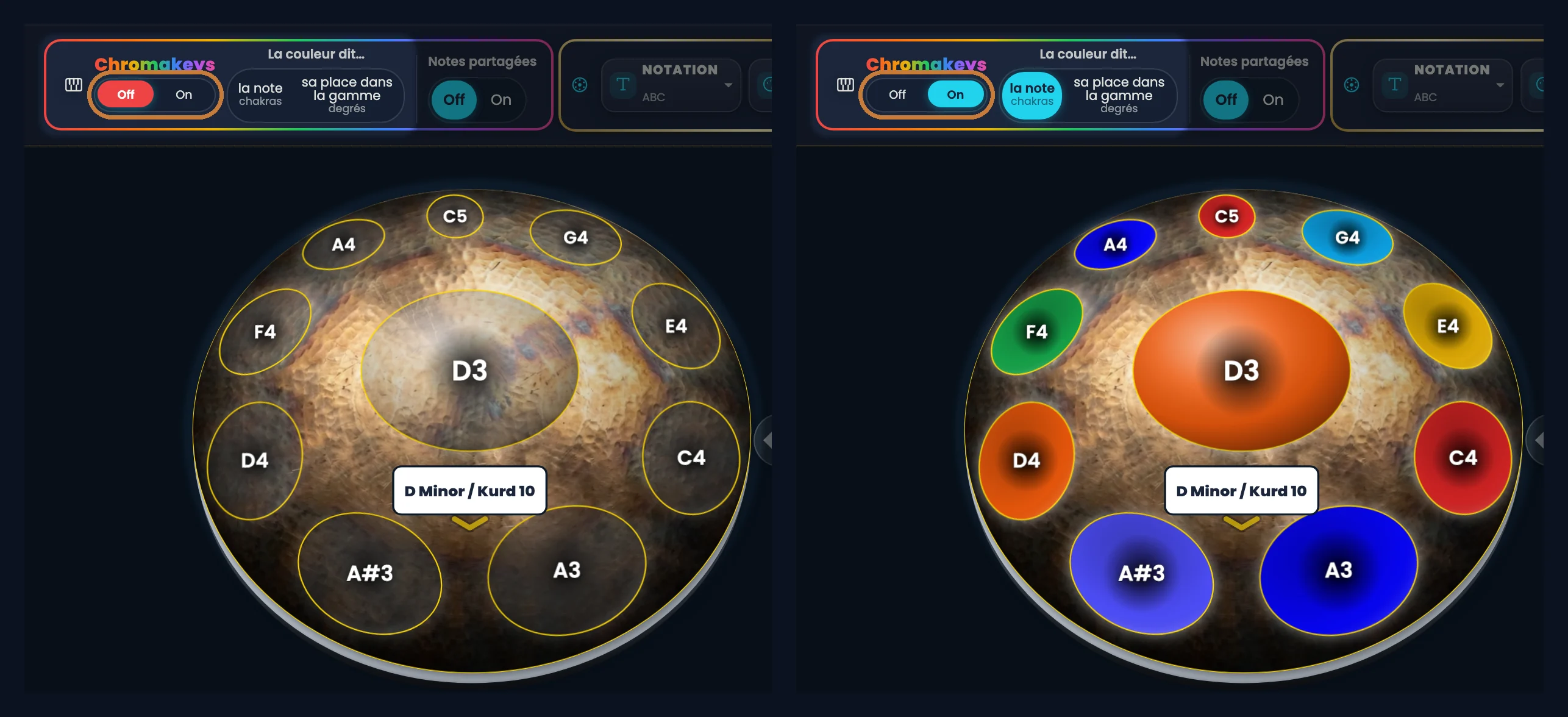
Click the image to open it, then click again for full size.
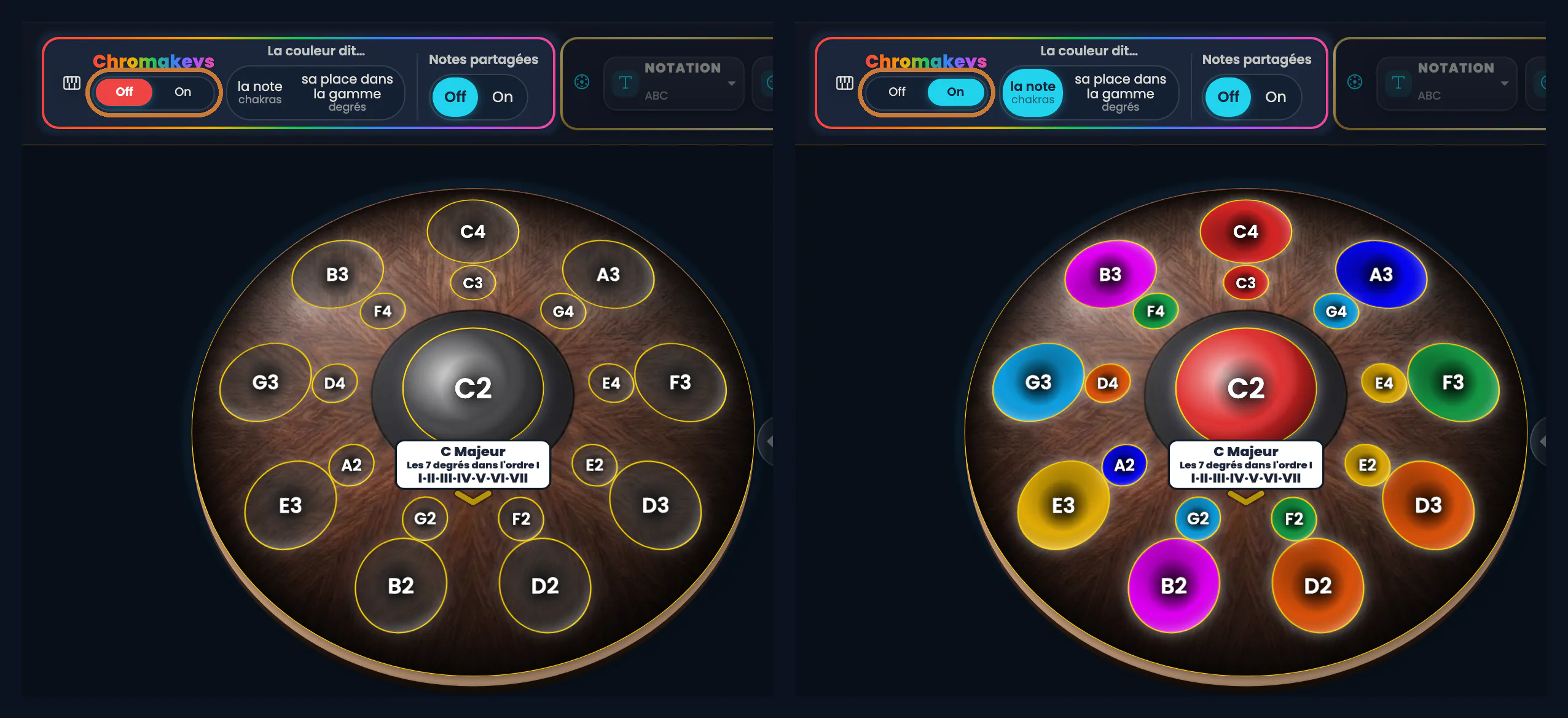
Click the image to open it, then click again for full size.
On an eighteen-note pan, the difference is even more striking.
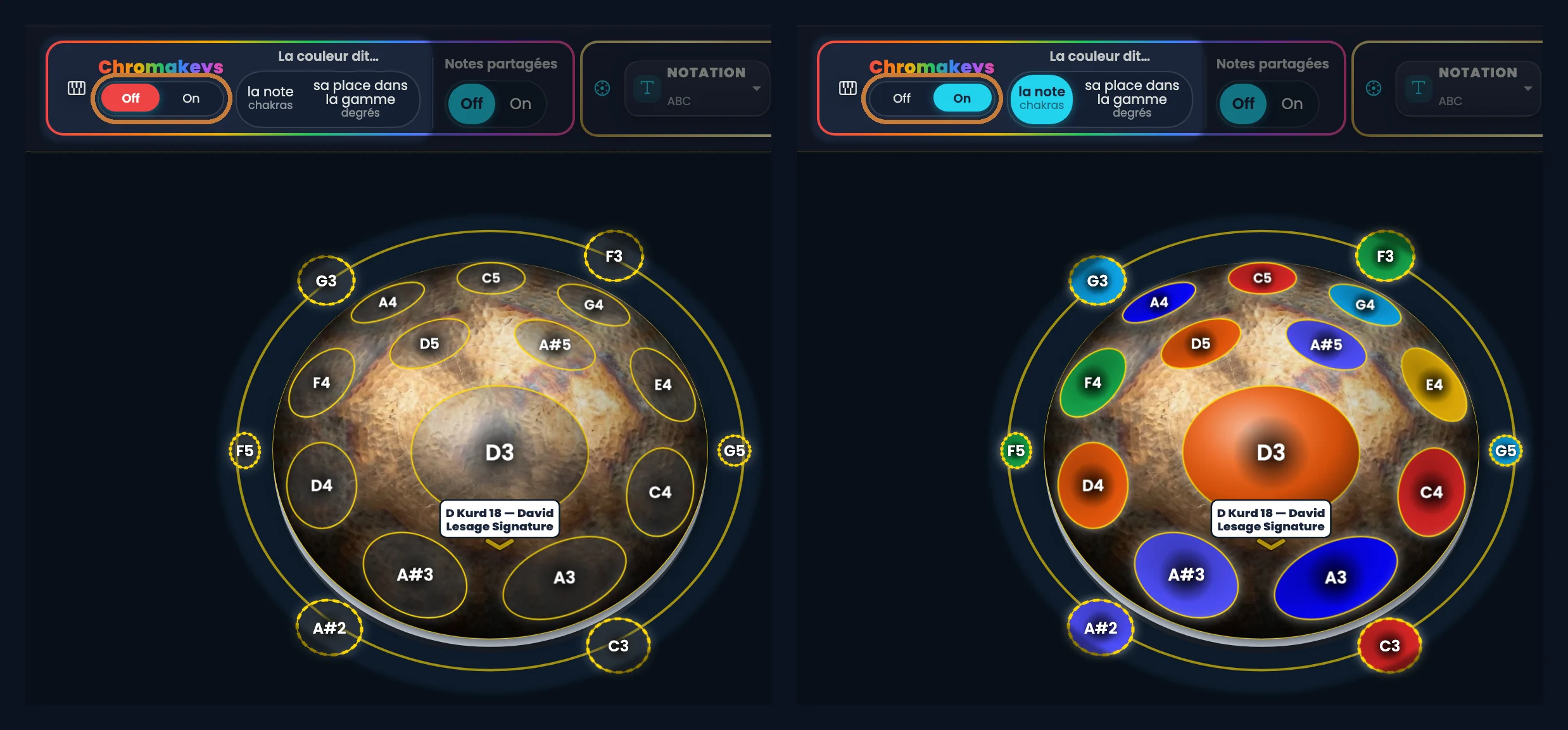
Click the image to open it, then click again for full size.
The ChromaKeys menu: three questions, not one
At the top of the screen, the toolbar. Inside it, an island with a multicoloured outline: ChromaKeys. It asks two questions, and a third one is set elsewhere, on the chord cards. All three are independent: you can answer one without touching the other two.
- Colour says… → the note · its place in the scale. For it to say nothing, you don’t need a third choice: that’s the Off switch under the ChromaKeys name. Switch back to On, and the last reading you chose comes back.
- Shared notes → Off / On
- Chord drawing → there’s nothing to click here: the eye lives on each chord card, at the bottom of the screen, not in the island.
You’ll notice that the two choices of “Colour says…” each carry two labels: the plain word first, and the theory word in small type right beside it. The note is what others call the chakras. Its place in the scale is what’s called the scale degrees. I say it once here, and after that I use the plain words.
”Colour says the note”: a C always red
First possible answer. Here the colour is glued to the name of the note, and it never moves again.
- A C is red.
- A D is orange.
- An F is green.
- An A is indigo.
All twelve notes have their colour — sharps included, each with its own shade. Change scale, change instrument, change key: nothing moves. Red stays C.
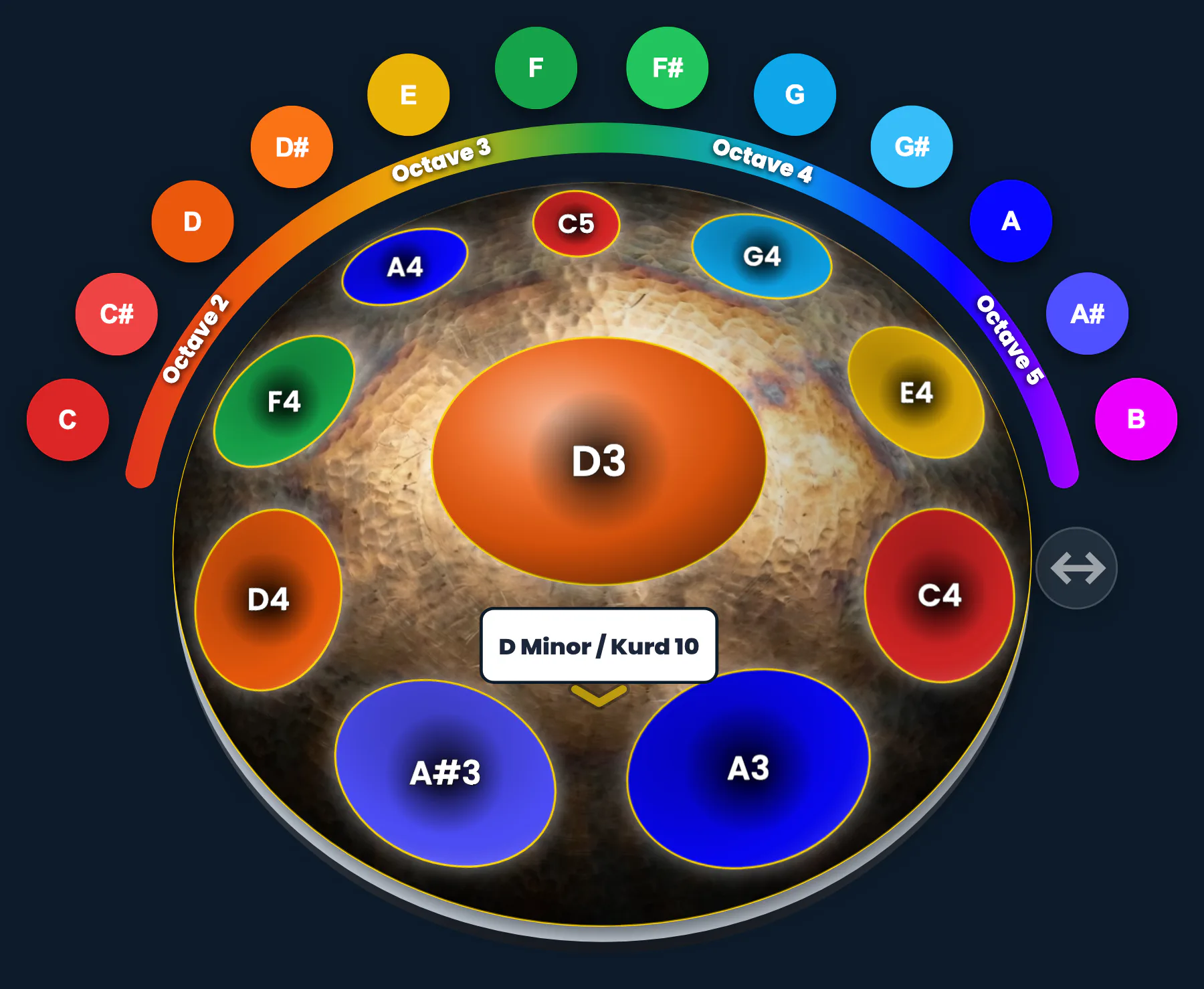
Click the image to open it, then click again for full size.
The most immediate benefit is the octave.
With nothing else turned on, every D on your shell is orange: the low one, the high one, the one up on the right. At a glance, you see they are the same note at different pitches.
That’s the kind of thing that takes months to absorb by ear, and becomes obvious in a second through colour.
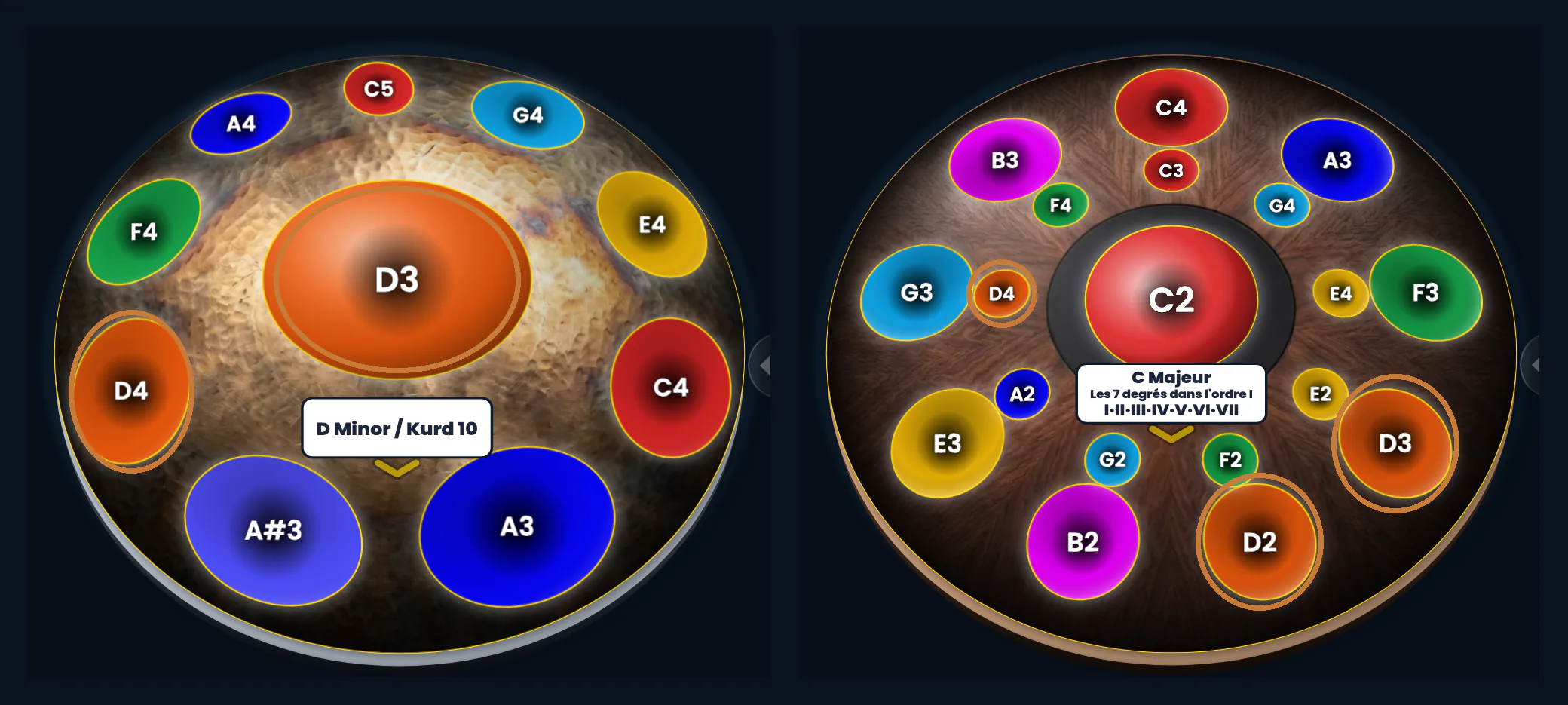
Click the image to open it, then click again for full size.
What is a scale degree?
Before the second answer, one word is needed. Just one.
A scale is seven places, from the first to the seventh. Like the steps of a staircase.
Each note of your scale sits on one step, and only one. The degree of a note is the number of its step. Nothing more.
What’s lovely is that the steps have a character — always the same one, in any key. I gave them names:
- I — Balance: home, where everything settles.
- II — Momentum: it starts, it pushes gently.
- III — Adventure: you leave the known behind.
- IV — Relaxation: you breathe.
- V — Tension: it pulls, it asks for what comes next.
- VI — Nostalgia: sweetness with a sting.
- VII — Mystery: suspended, it can’t stay there.
Each one also has its vowel, to sing: OU · O (as in “beau”) · O (as in “or”) · A · E · I · M. That’s the bridge to singing, and it’s worked on in Sing & Play mode — a subject of its own.
”Colour says its place in the scale”
Second answer. Here the colour no longer looks at the note’s name: it looks at the chord it serves in your scale.
On an electronic handpan, in Logic mode, this colour is the colour of the chord’s degree. The I chord is always red, the II orange, and so on. If your scale is in D, it’s the notes of the D chord that turn red. Colour follows the place, not the name.
A visible consequence: two notes with the same name can carry two different colours, because they don’t serve the same chord.
And the pattern of the seven colours stays identical from one key to another: that’s what lets you play the same thing elsewhere without relearning anything.
Outside Logic mode — in Scales, in My instrument, and always on an acoustic handpan — the button keeps the same name, but each chord takes the colour of the note it is named after. You still see at a glance which notes go together, but it is no longer the reading by degrees.
On the D Kurd in the screenshots below, F4 and A4 take on D’s orange: they aren’t Ds, but they belong to the D chord.
The two readings, side by side
Here is the same handpan, photographed twice: on the left the colour says the note, on the right its place in the scale. Nothing else has moved.
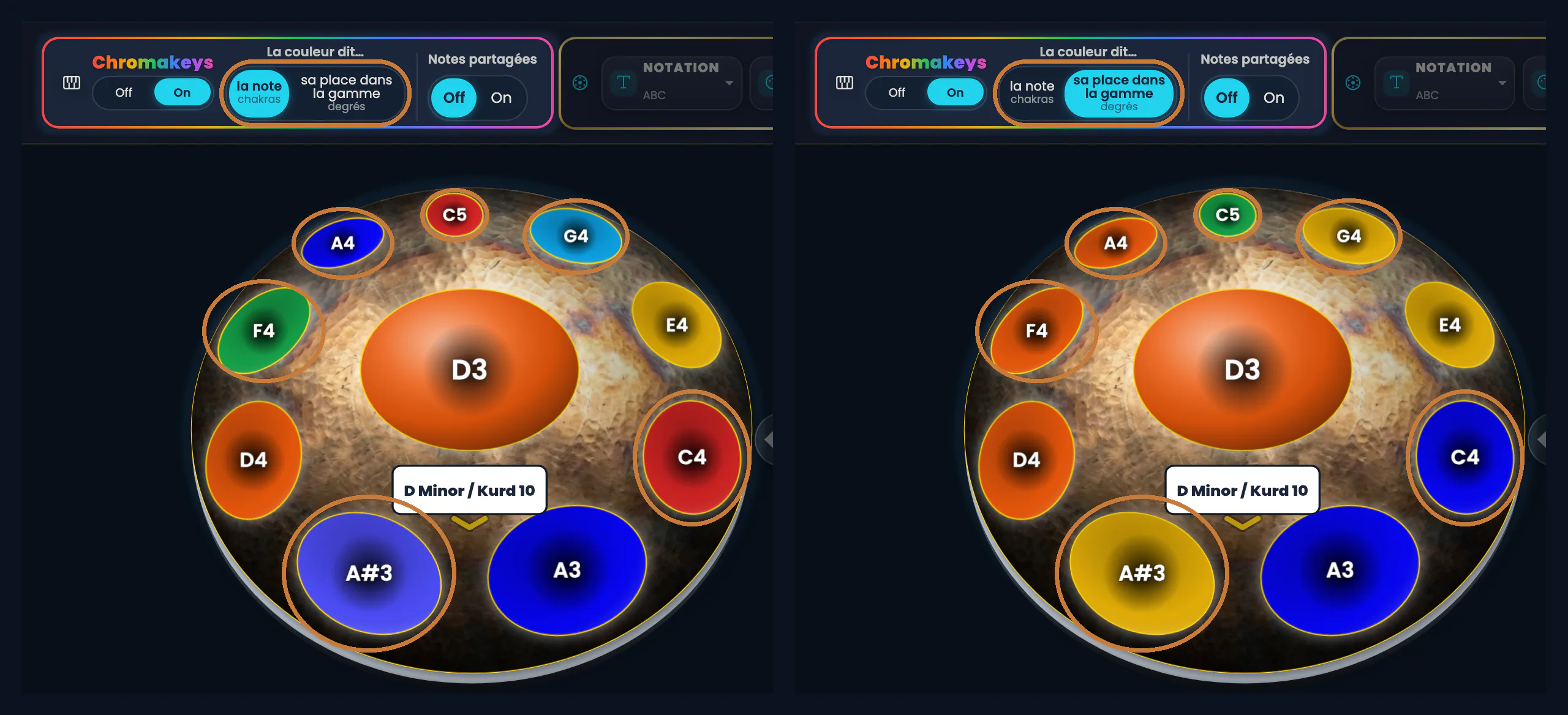
Click the image to open it, then click again for full size.
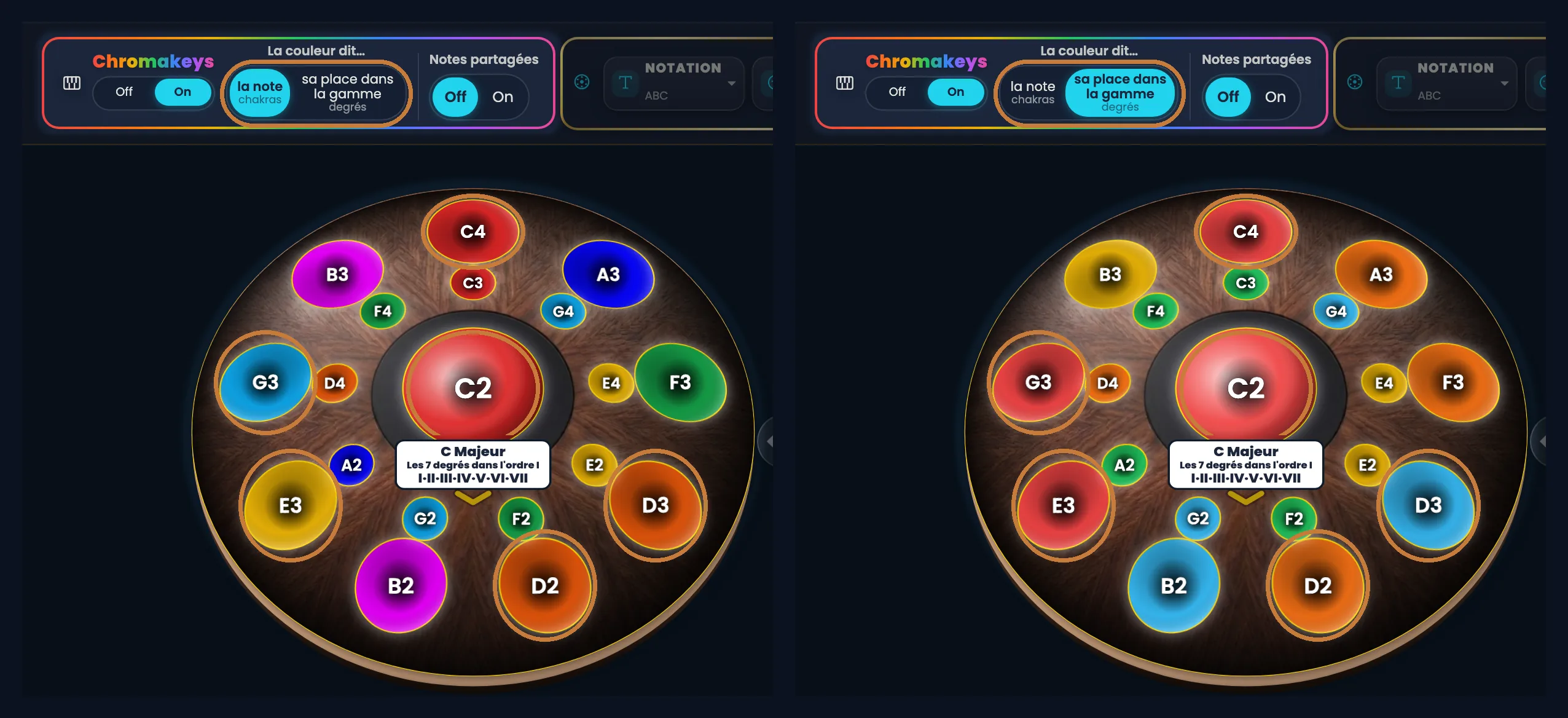
Click the image to open it, then click again for full size.
When there are a lot of notes
Ten notes, you can remember. But my stage handpan has eighteen. Here are the two readings you’ve just seen, on that big instrument.
When the brain has a lot of information to handle at once, it stops sorting: it just takes the hit. Colour does the sorting for it.
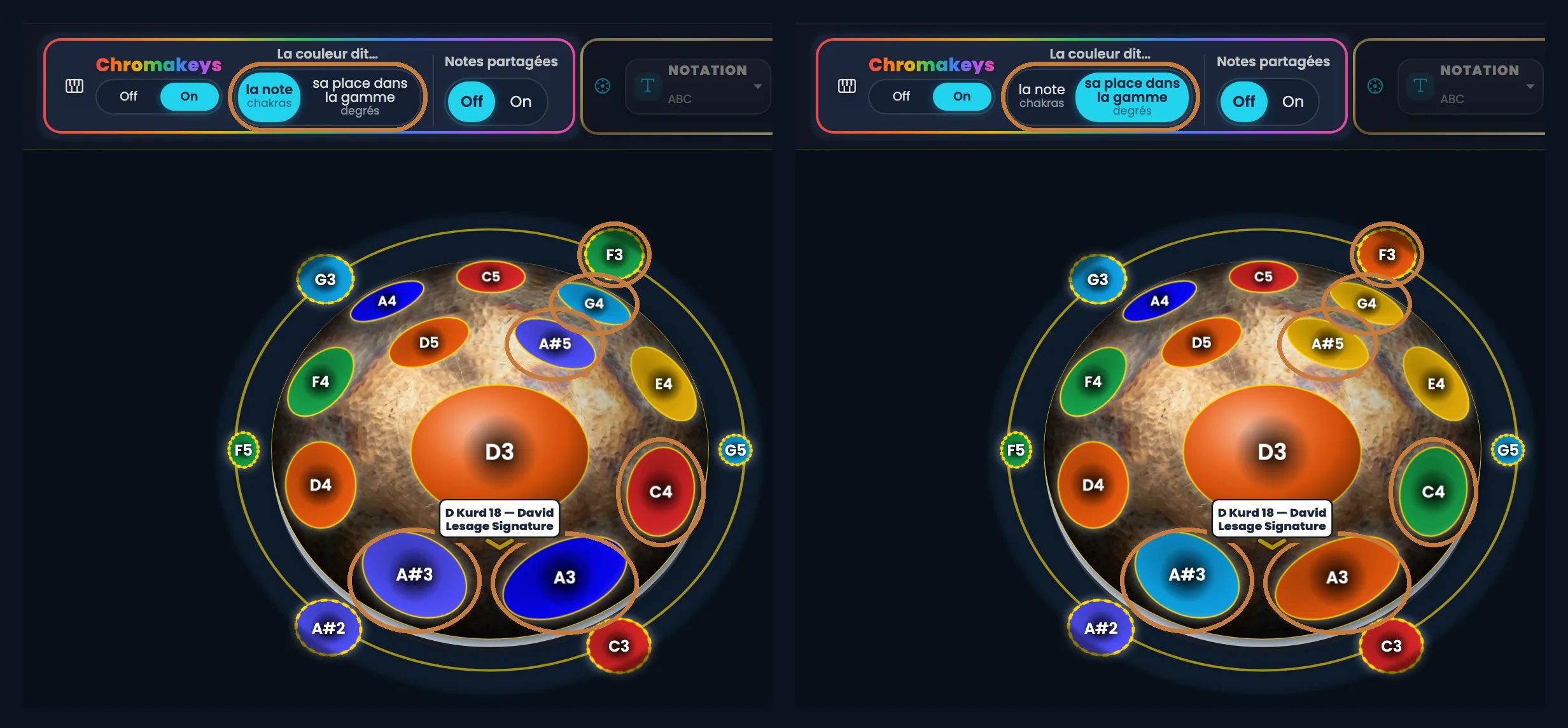
Click the image to open it, then click again for full size.
”Shared notes”: when one note serves several chords
Third idea, and it’s a setting of its own.
One and the same note can belong to several chords.
When Shared notes is On, that note splits into slices — a pie, one slice per chord it takes part in, each slice in the colour of the chord concerned.
When the colour says the note, sharing takes another form: a thin ring around the note’s colour, which keeps the note recognisable.
Three things to know:
- On an acoustic D Kurd 10, eight notes out of ten split. That isn’t a textbook case: that’s nearly your whole shell.
- In Logic mode too, on a Neotone Mutant in C major, many notes are split: the seven degrees share notes.
- The slices disappear as soon as a chord eye is opened. The two never coexist on screen: either you look at the network of shared notes, or you look at a drawn chord.
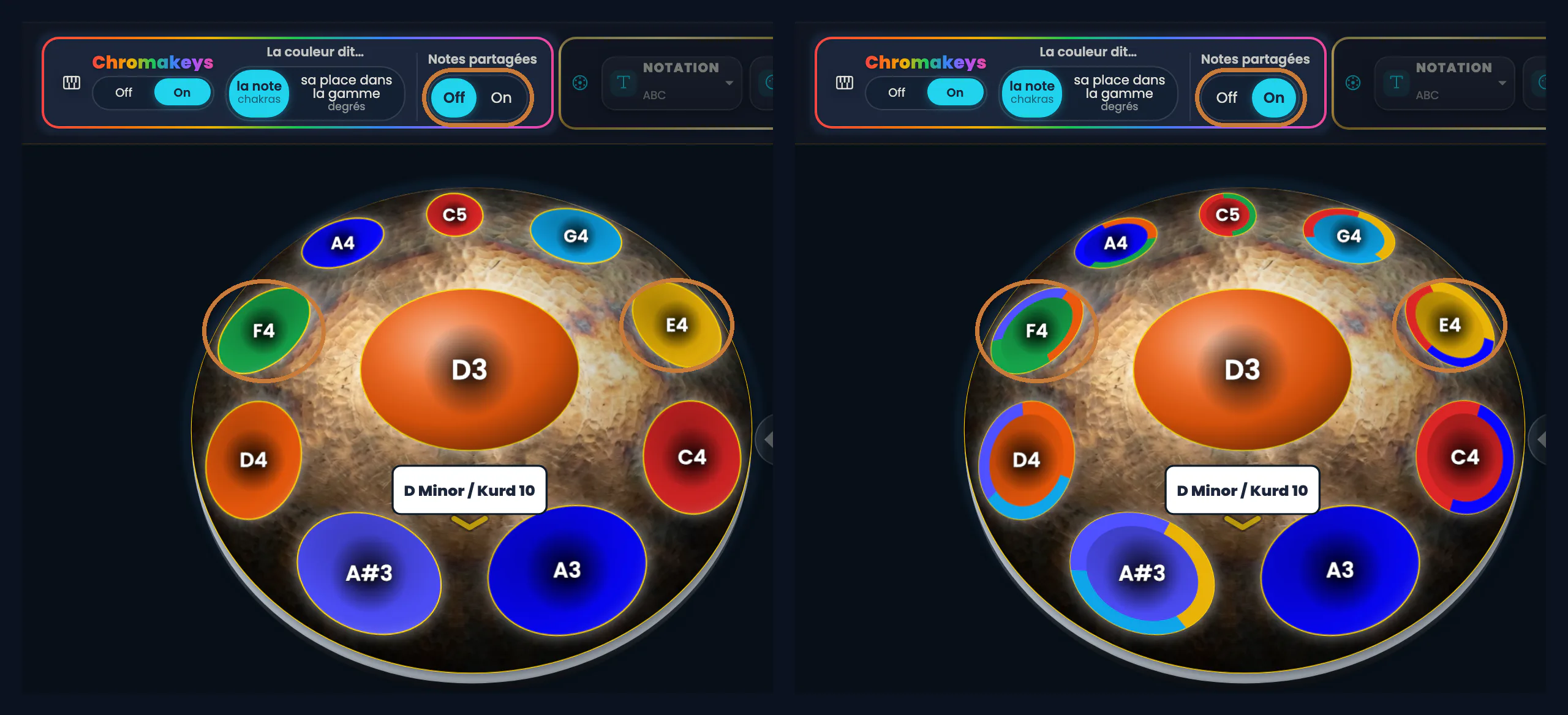
Click the image to open it, then click again for full size.
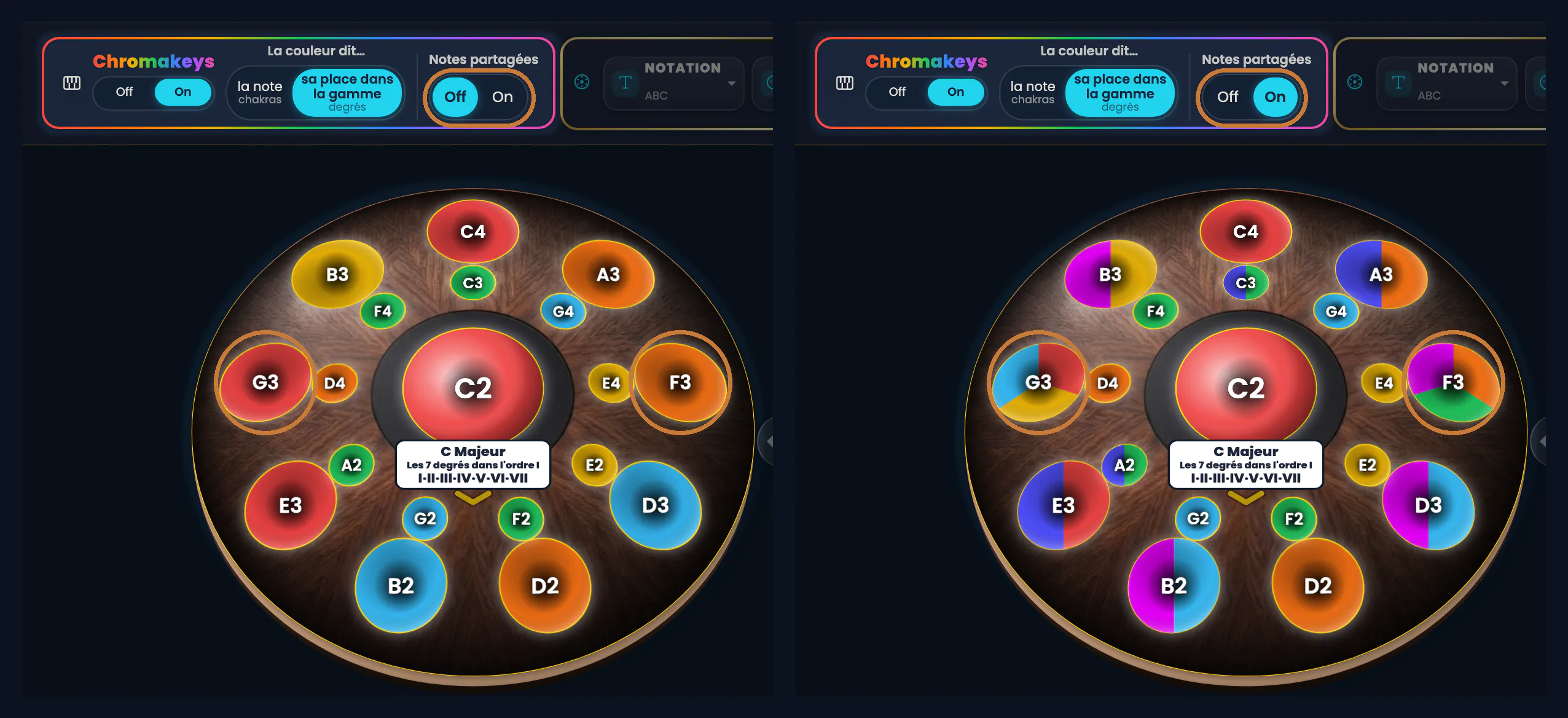
Click the image to open it, then click again for full size.
”Chord drawing”: the eye that traces the constellation
On each chord card, at the bottom of the screen, there’s an eye.
You open it, and the chord’s constellation is traced on the instrument: a path linking its notes together.
That drawing is what stays the same when you change key — and that’s where Logic mode becomes a machine for understanding.
What you see depends on your answer to the first question:
- With “its place in the scale”: the whole chord takes the colour of its degree — the I entirely red — and the rest of the instrument dims to grey.
- With “the note”: the constellation is traced just the same, but each note keeps its own colour. The rest dims too.
Two ways of looking at the same chord: its function on one side, its geography on the other.
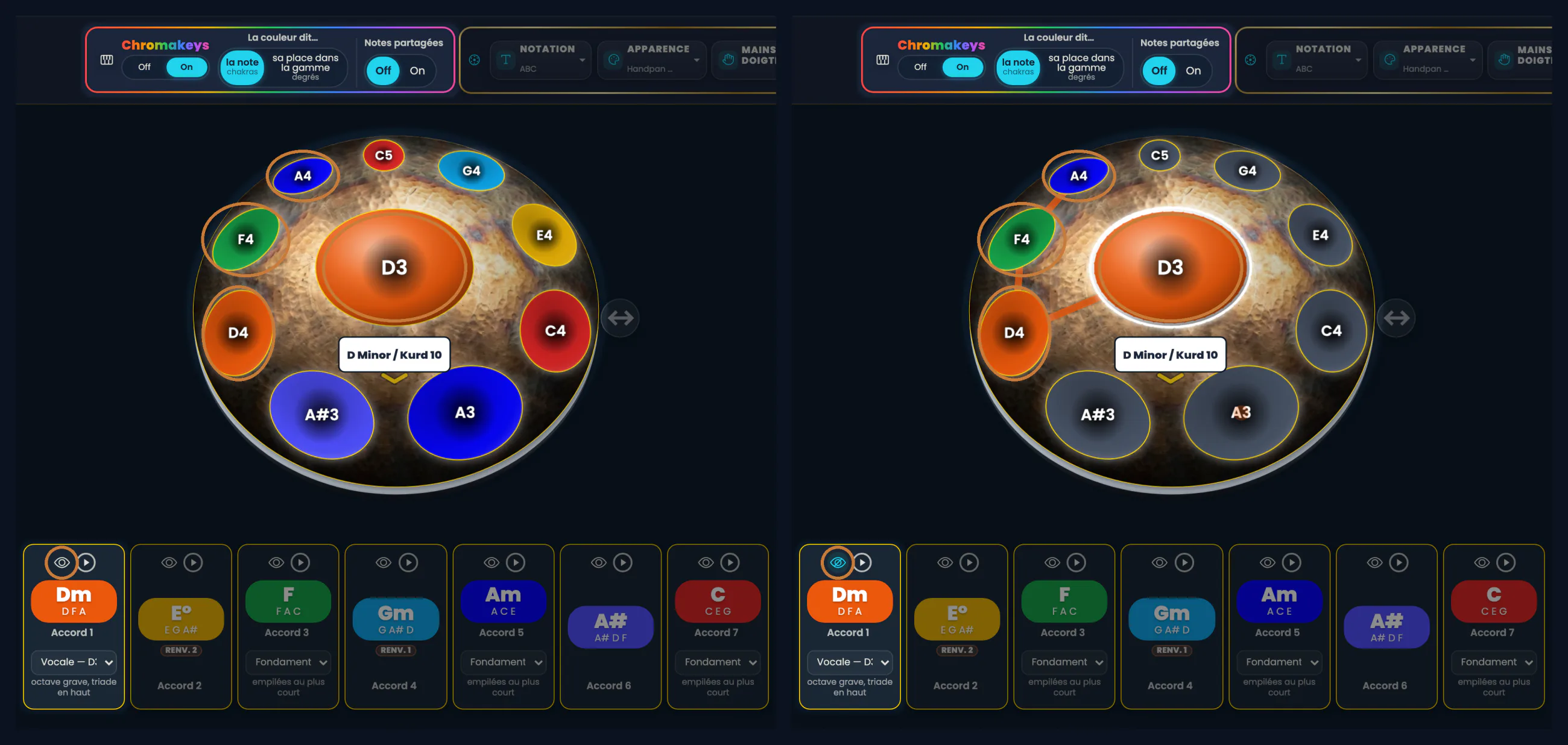
Click the image to open it, then click again for full size.
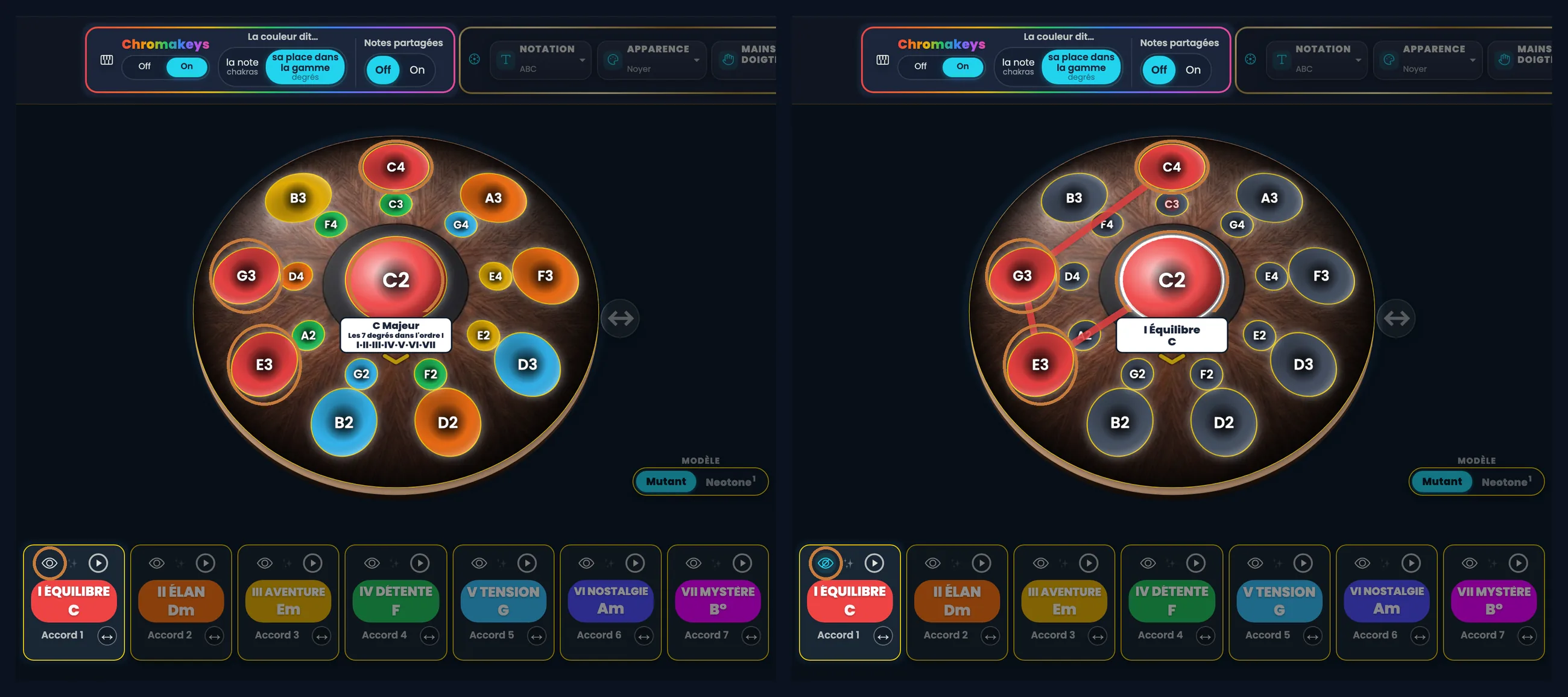
Click the image to open it, then click again for full size.
You have nothing to set: the presets by level
If all that sounds like a lot, good news: you have nothing to do. Your level answers for you, and you can always come back to it later.
| Level | Colour says… | Shared notes |
|---|---|---|
| Discovery | the note | Off |
| Apprentice | its place in the scale | On |
| Musician | everything visible and adjustable | your choice |
In Discovery, the island shrinks to the essentials: a single switch, Off or On. The other two settings are put away: you can’t knock them out of place by accident, and they come back at Apprentice level.
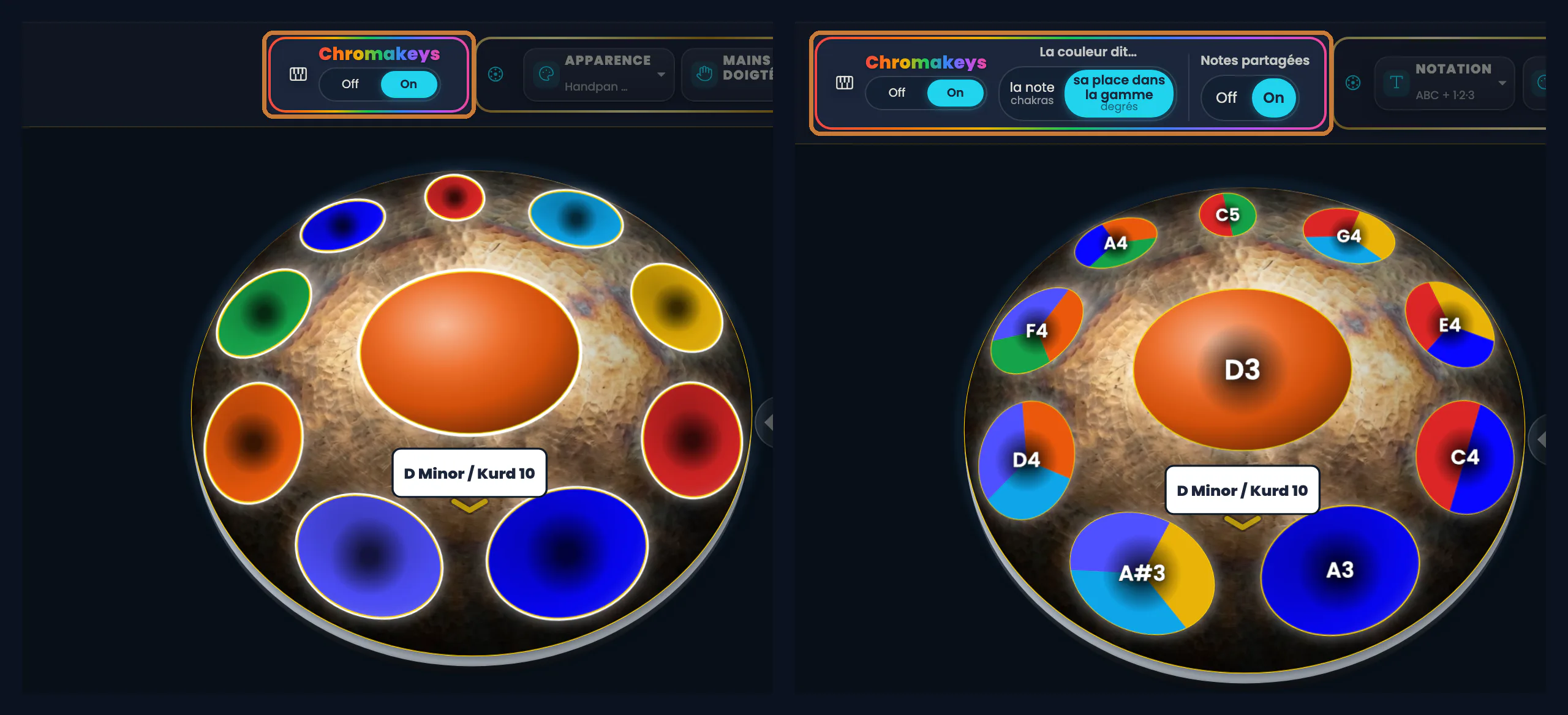
Click the image to open it, then click again for full size.
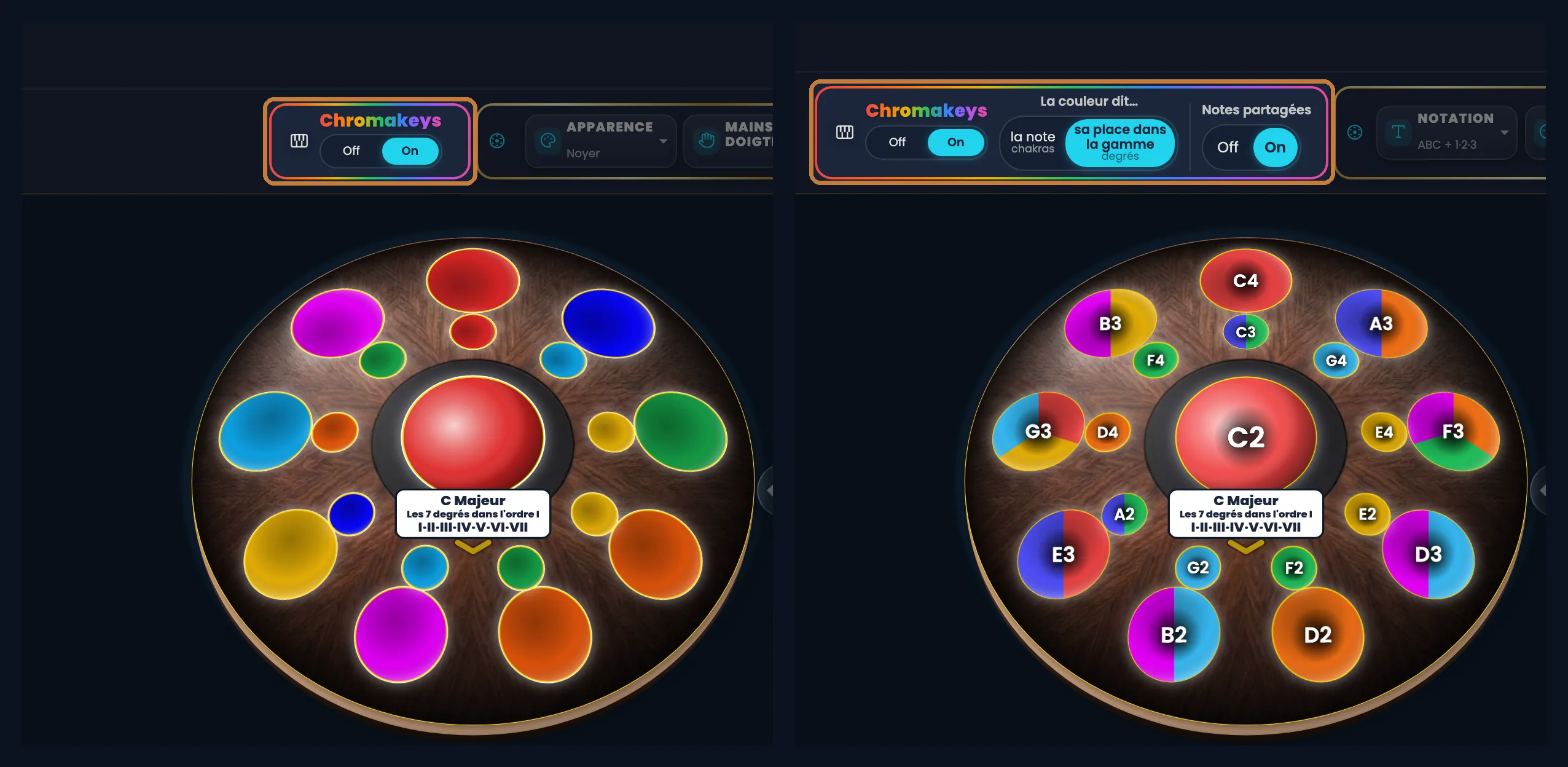
Click the image to open it, then click again for full size.
And next
Once you read the colours by place in the scale, something unexpected happens: the drawing of each chord no longer depends on the key. The I has the same shape in C, in D, in A. It is exactly the gesture of a guitarist putting on a capo — except that on an electronic handpan, the capo is a button. That’s the subject of the next article: The handpan capo.
The words don’t change from one instrument to the other — acoustic or electronic, it’s the same screen, the same three questions. That’s the point.
Ready to make your colours sing?
Try the app for free, or discover the electronic Neotone handpan.