Constellations: seeing a chord as a shape
Whether your handpan is acoustic or electronic, a chord becomes a drawing. Discover the 3 ways to trace a Constellation: Polygon, Open and Hands.
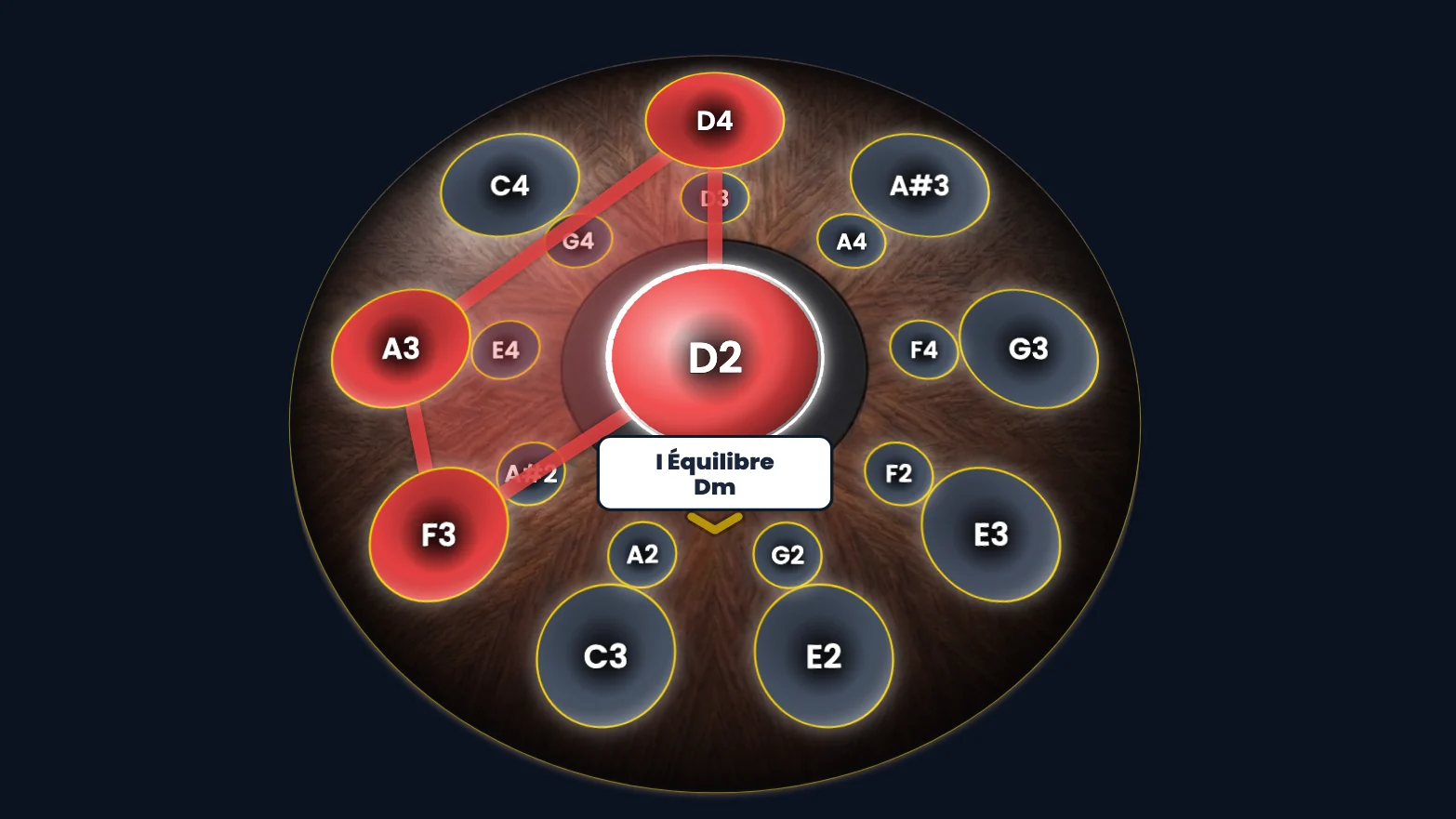
A Constellation is a chord you see rather than a chord you count. In Handpan Constellation Studio, the notes that sound together link up with glowing lines and form a recognisable figure. Your eye keeps a drawing, your hand replays it.
This holds whether your handpan is acoustic or electronic. An acoustic pan in D Kurd 10 and a Neotone both draw their chords: same lines, same reading, same gesture. The app offers three ways to trace that shape: Polygon, Open and Hands.
To see this language in motion, here is the first video of the series about the app.
Why a shape instead of a list
Memorising “D, F, A” means translating every single time. Memorising a triangle sitting at a precise spot on your pan does not: your brain loves shapes. That’s the heart of the ChromaKeys method, which you can explore in Playing handpan by colours. The Constellation is simply the next step: when several colours meet, they draw something.
Handpan Constellation Studio lets you choose how that drawing appears, depending on what you want to understand: the overall shape of the chord, the order in which you play the notes, or how they split between your two hands. All three traces exist on both sides: on an acoustic instrument just as on an electronic one.
The 3 Constellation traces
The setting lives in the palette, under Constellation: three buttons, Polygon, Open and Hands. To see clearly what changes, we keep the same chord, D minor (D, F, A), and touch only that setting.
The Polygon: the closed shape
Polygon mode links every note of the chord into a closed figure — a triangle for three notes, a quadrilateral for four, and so on. It’s the most “at a glance” view: you recognise the chord the way you’d recognise a logo. Ideal for memorising a chord and recognising it at a glance.
The Open trace: the path of the notes
Open mode doesn’t close the figure: it draws the path from one note to the next, from the lowest to the highest. It’s the view of the gesture. You no longer just see which chord you’re playing, but how your hand travels through it: perfect for working on an arpeggio or a melodic phrase and feeling the direction of the movement.
Hands: who plays what
Hands mode colours the trace according to which hand plays each note. At a glance, you know what the left hand does and what the right hand does. It’s a precious cue when a chord splits between both hands, or when you want to balance your playing without tensing up.
The three traces, acoustic and electronic
Here are the three traces on an electronic pan, a Neotone Mutant in Logic mode, anchored on D, Sad mode.

Click the image to open it, then click again for full size.
And the same three traces on an acoustic pan, a D Kurd 10. On this pan, the path follows the real layout of your notes; on the electronic pan, the layout of your pads.

Click the image to open it, then click again for full size.
What differs between acoustic and electronic
On an acoustic handpan, the chord is drawn from your real notes, laid out as they are on your instrument: the resulting shape is specific to your pan. Two different scales give two different drawings for the same chord. The Constellation speaks to you about your instrument.
On an electronic handpan, in Logic mode, the shape of a scale degree is fixed by the pad layout: the I keeps the same drawing whatever the key, only the notes played change.
So you keep the same fingering from one key to another. That is the subject of the article The handpan capo.
Switching between traces
The real comfort is being able to flip between these three views on the same Constellation. You memorise the overall shape with Polygon, work the gesture with Open, then check your split with Hands. Three lights on a single chord, without ever opening a score — and in the same way, whatever your instrument.
And if you want to invent your own coloured chords, the app lets you compose freely: read Create your own handpan scale to see how creation works (free in acoustic mode).
Constellations make visible what usually stays abstract. You no longer “know” a chord: you see it. Open Handpan Constellation Studio, pick your instrument — acoustic or electronic — and watch your first triangle light up.
Ready to make your colours sing?
Try the app for free, or discover the electronic Neotone handpan.